githubEdit

Node Deployment

Deployment Methods Overview

This guide provides three deployment methods. If you are not sure which one to pick, start with Method 1: One-Command Deployment.

Method
Best for
Trade-off

Method 1: One-Command Deployment (Recommended)

First-time deployment and fastest bootstrap

Less manual control

Method 2: Advanced Quick Deployment (Manual Variables)

Fast deployment with explicit environment variable control

Sensitive variables are handled directly in shell session

Method 3: Manual Deployment

Teams that need full control and manual review of each step

More setup time and manual work

Before running any method, review Preparation - Server Infrastructure.

For a fast bootstrap, run:

curl -fsSL https://on.nexus/install.sh | bash
circle-info

Run this command on your target server. For production environments, review the script before execution.

Method 2: Advanced Quick Deployment (Manual Variables)

# Log in to the remote server
ssh [email protected]
# See below for environment variable configuration requirements
export APP_ENV=test
# Network endpoint variables (configure according to APP_ENV):
# DOTSWAP_HOST, ORD_URL, NODES_BTC_NODE_CONFIG_HOST, NODES_BTC_NODE_CONFIG_USER, NODES_BTC_NODE_CONFIG_PASS, NODES_BTC_NODE_ZMQ_HOST
export DOTSWAP_ACCOUNT_ADDRESS=tb1qmlp2ghv2xfv6h2ypmg9gt58uhmegse6c3tyhzq
export DOTSWAP_ACCOUNT_PRIVATE_KEY_HEX=853ac0c5ba7f629c20a8df8a86ae98e18a47c1262502e8a6ad0d074f3c2cf1af
export MNEMONIC='trumpet ten limb stay exact seven digital verify chronic solve face syrup'
export POOLS_BTC_DOGGOTOTHEMOON=tb1qmlp2ghv2xfv6h2ypmg9gt58uhmegse6c3tyhzq
export POOLS_BTC_BILLIONDOLLARCAT=tb1q7qfcw03psf3tla59ahdazu2huh7vru27k24qnl,tb1pau57plr6p56984zq9xlku5ferak2jjux5ljzajlr4t6ks6lm989s6ph428
export SINGLE_LIQUIDITY_POOLS_BTC_USDCSTARKNETTEST=tb1qzn8v9g34zyqsuy2rqnk0nddyffcdgxznr6jqzu,tb1qf00w6ryyfcemvsejne2rhgdcnjl343yp6h4aux

# Taker config
export TAKER_MNEMONIC='trumpet ten limb stay exact seven digital verify chronic solve face syrup'
export TAKERS_BTC_DOGGOTOTHEMOON=tb1qf00w6ryyfcemvsejne2rhgdcnjl343yp6h4aux

curl -fsSL https://get.docker.com | bash -s docker
env | grep -E '^(POOLS_|TAKERS_|SINGLE_LIQUIDITY_POOLS_)' > .env
curl -fsSL https://on.nexus/docker-compose-v3.yml | docker compose -p dotswap-dex -f - up --wait --force-recreate

Use sudo only if your current user cannot run Docker commands directly.

circle-info

Remember to use your own address/private key/mnemonics

Method 3: Manual Deployment

Docker Installation

The recommended way to deploy DOTSWAP DEX is using Docker. To install Docker, please refer to Docker's Installation Guidearrow-up-right. For questions regarding Docker installation, please refer to Docker's Troubleshooting Guidearrow-up-right.

Get Deployment Script

Download the latest configuration file docker-compose.yml from DOTSWAParrow-up-right.

Environment Variable Configuration

Before running DEX, you need to modify the following environment variables in docker-compose.yml:

  • APP_ENV: Runtime environment. test maps to testnet4, prod maps to mainnet.

  • DOTSWAP_HOST: DotSwap API endpoint. Configure for both testnet4 and mainnet according to APP_ENV.

  • ORD_URL: Ord service endpoint. Configure for both testnet4 and mainnet according to APP_ENV.

  • NODES_BTC_NODE_CONFIG_HOST: Bitcoin node RPC endpoint (host:port). Configure for both testnet4 and mainnet according to APP_ENV.

  • NODES_BTC_NODE_CONFIG_USER: Bitcoin node RPC username. Configure for both testnet4 and mainnet according to APP_ENV.

  • NODES_BTC_NODE_CONFIG_PASS: Bitcoin node RPC password. Configure for both testnet4 and mainnet according to APP_ENV.

  • NODES_BTC_NODE_ZMQ_HOST: Bitcoin node ZMQ endpoint (tcp://host:port). Configure for both testnet4 and mainnet according to APP_ENV.

  • DOTSWAP_ACCOUNT_ADDRESS: The wallet address to register with DotSwap Nexus as the Market Making Account.

  • DOTSWAP_ACCOUNT_PRIVATE_KEY_HEX: The private key (hex) of the wallet address to register with DotSwap Nexus, used to prove ownership of this address.

  • MNEMONIC: The wallet mnemonic phrase for allowing the independent DotSwap Nexus instance to sign transaction and provide liquidity.

  • POOLS_BTC_TOKEN: The key is the names of the involved tokens in a trading pair, and the value is the address information for providing liquidity. For example:

    • To provide liquidity for BTC and DOG•GO•TO•THE•MOON, the environment variable is configured as POOLS_BTC_DOGGOTOTHEMOON:addr

    • If BTC and DOG•GO•TO•THE•MOON are provided liquidity from different addresses (e.g. you're using Xverse wallet), the environment variable is configured as POOLS_BTC_DOGGOTOTHEMOON:addr1,addr2

    • Multiple trading pairs can be configured, but one address can only be configured for one trading pair.

    • Note that Token names should not contain the • symbol.

  • SINGLE_LIQUIDITY_POOLS_BTC_TOKEN: Single-sided liquidity pool address configuration. Supports one or two addresses (comma-separated). Example: SINGLE_LIQUIDITY_POOLS_BTC_USDCSTARKNETTEST: addr1,addr2

    • Do not use special symbols (such as ) in env variable names.

  • TAKER_MNEMONIC: The wallet mnemonic phrase for allowing the independent DotSwap Nexus instance to sign transaction and swap.

  • TAKERS_BTC_TOKEN: Same like POOLS_BTC_TOKEN

Configuration Example

Pay attention to the indentation level of the YAML configuration to ensure it is correct. If the value of a configuration item is a multi-line string, use | or > correctly to maintain the format and follow YAML's indentation rules.

Start Service

Check the docker-compose version; it needs to be greater than 1.21.0.

Execute the following command in the terminal to start DOTSWAP DEX:

Access Service

After successful startup, you can access it via http://:17610arrow-up-right.

Security Operations

Security Hardening

After you have confirmed that your node is deployed and running stably, you must perform the following critical step:

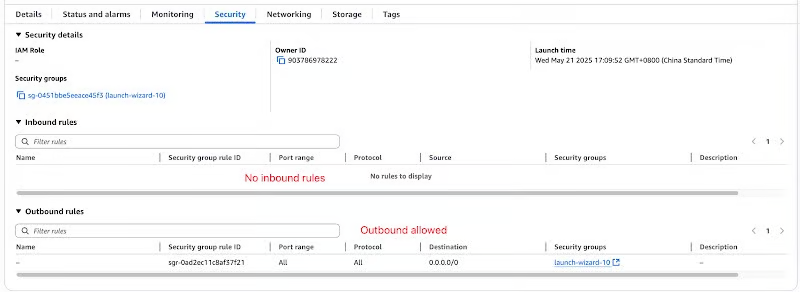
  • Remove SSH Access Rule: Return to your firewall settings and delete or disable the rule allowing SSH (port 22) access that you created in Stage 1.

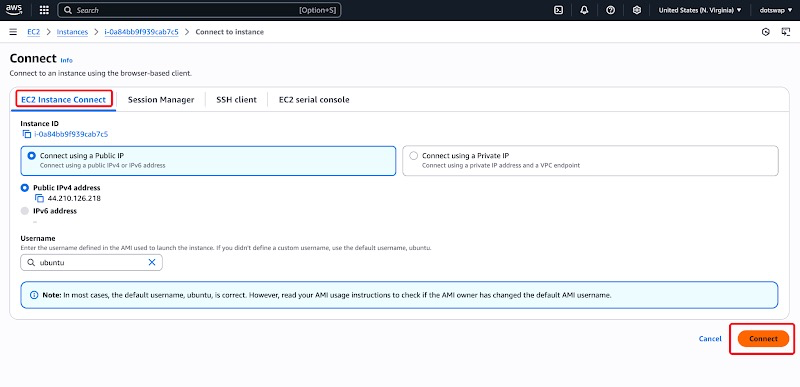
  • How to manage the server after closing SSH? You will no longer connect via public SSH. Instead, you should rely exclusively on the secure, in-browser management tools provided by your cloud provider (e.g., AWS Session Manager, Linode Lish Console), which is the industry-recommended best practice.

triangle-exclamation

Last updated