

Split
API Base
Test URL: https://test-api-proxy.ddpurse.com
Main URL: https://api-btc.tiertop.io
You can split the CAT20 assets of a specified address into different addresses through the following interface.
token
tickName + colon + tokenId
Whether it's an official token (individuals should default to false, otherwise contact the official for whitelisting)
Whether to split evenly to the original address
Split Amount
Current User Address
Current User Public Key
txid + colon + vout
Required if selecting an official token
Success
Success
POST /brc20swap/get_split_cat20_psbts HTTP/1.1
Content-Type: application/json
Accept: */*
Content-Length: 220

{
  "tick": "text",
  "is_ofc_token": true,
  "is_average_split": true,
  "split_num": 1,
  "toinfos": [
    {
      "to_addr": "text",
      "to_amt": 1
    }
  ],
  "user_addr": "text",
  "user_pubkey": "text",
  "cat_20_output_to_split": "text",
  "token_addr": "text",
  "fee_rate": 1
}{
"code": 1,
"msg": "text",
"data": null
}Split Users' CAT20
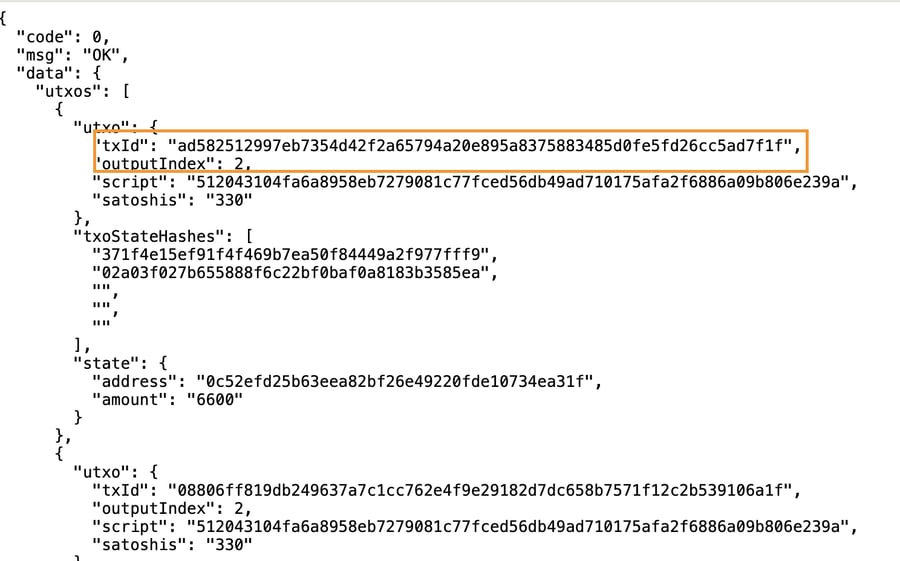
Regarding cat_20_output_to_split, you need to query the corresponding CAT20 UTXO of the corresponding address, find the UTXO you want to split, and then concatenate it with the txId and outputIndex of the corresponding UTXO Query address reference (please replace tokenIdOrTokenAddr and ownerAddrOrPkh)
Split Official CAT20
If you're using Nexus's CAT20 deposit endpoint, you can use these 2 endpoints to split your deposited CAT20 tokens (aka "official CAT20", since they are in Nexus's liquidity pool.)
When you first call the deposit endpoint
/create_deposit_cat20_psbtv2, you can set the parameternot_split:true.If the deposit is succesful,
/create_deposit_cat20_order_by_psbtwill returnreceiver_addrandtxid.

Then, you can use the following parameters to call the split endpoint POST /brc20swap/get_split_cat20_psbts.
token
Success
Success
POST /brc20swap/save_split_cat20_psbts HTTP/1.1
Content-Type: application/json
Accept: */*
Content-Length: 89

{
  "psbts": [
    "text"
  ],
  "Other parameters are the same as those for get_psbt endpoint.": "text"
}{
"code": 1,
"msg": "text",
"data": {
"tx_id": "text"
}
}Last updated